Release note #8
09-06-2026
Good day,
We’re pleased to share that a new deployment has just been released. Here’s a summary of the improvements we’ve implemented to support your work:
Export Booking Module
Rebooking orders with status Booking Cancelled or Booking Failed
Users can now rebook an order when its status is Booking Cancelled or Booking Failed and the ETD is in the past, provided no container numbers are attached to the order. Previously the system blocked this action, requiring manual intervention from support. This restriction has been removed.
Transport order contact details now configurable
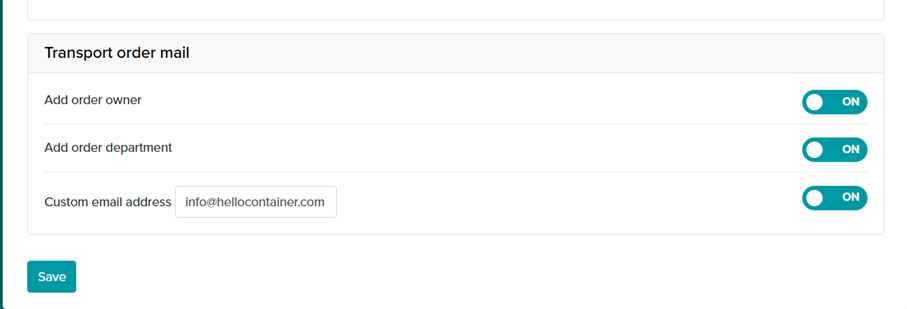
Super Users can now configure per customer in MySettings which contact details are displayed on the transport order template and corresponding email. Three options can be freely toggled on or off:
- Owner: displays the booking owner on the template and in the email.
- Department: displays the department of the booking, including the email addresses of all active platform users linked to that department.
- Email address: adds a custom free-text email address to the template and email.
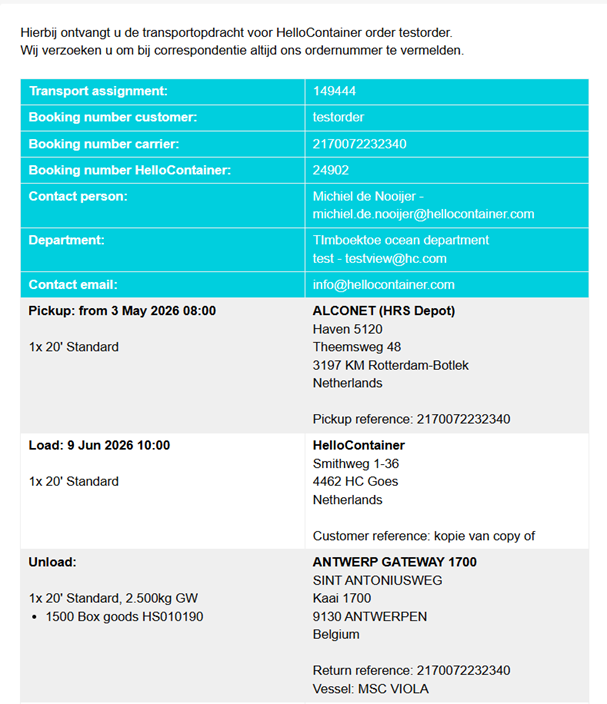
The selected details are visible in the transport order preview and in the final email/PDF sent to trucking companies or barge operators.
External transport orders with status ‘booking’ are informational only
External transport orders with status booking displayed in step 2 of the routing are now strictly informational. They indicate that a barge or carrier leg is part of the routing. These orders do not affect the trucking workflow: they have no impact on Trucking Planned or Trucking Confirmed statuses, and do not trigger any trucking workflow actions.
Bug Fixes
Invalid filter options in tasks and declarations overviews corrected
The overview tables for Tasks and Declarations were showing incorrect filter options. The status filter for Tasks now shows the correct task statuses. For Declarations, the status filter shows the correct declaration statuses and the type filter shows the correct declaration types.
Dashboard no longer crashes on missing or outdated widget type
In some cases the dashboard could fully crash when a widget had an unknown or outdated type stored. This has been resolved: widgets with an invalid type are now silently filtered out without affecting the rest of the dashboard.
Incorrect notifications for containers that already left the transit port
Users were receiving daily alerts for containers exceeding 3 days in the transit port, even after the container had already departed. The notification system was not correctly stopping alerts upon receiving a departure event. This has been fixed.
FTL and conventional orders could get stuck at carrier confirmation
FTL and conventional orders (non-container orders) could get stuck at the carrier confirmation step due to a missing validation guard. This caused the step to be incorrectly blocked. The issue has been resolved; container orders are unaffected.